The Best Borescopes for Android
Most Android phones take a plug-in USB-C borescope over USB OTG, so you can plug straight in with no pairing and no WiFi lag. You can also go wireless (WiFi) like any phone. Here are the best Android borescopes, wired and wireless, by use.

- 5 picks compared
- Specs checked against maker data
- No paid placements
GaugeGrade is reader-supported. When you buy through links on our site we may earn an affiliate commission at no extra cost to you. We only recommend gear we have researched against verified manufacturer specifications.
- 1Wired USB-C (OTG) plugs straight in with no pairing and no WiFi lag; WiFi models also work.
- 2Wired is steadier for close work; wireless is tidier and lets the phone charge while you inspect.
- 3For cylinders, pick a thin 3.9–5.5 mm probe.
What we recommend
Compare the key specs side by side, then read the full notes on each pick below.
- Connection
- USB-C, wired(Android 9+)
- Resolution
- 2K (2560 × 1440), dual lens
- Cable
- 16.5ft
- Connection
- WiFi(Android 7+)
- Resolution
- 1080p, 5.5 mm
- Cable
- 11.5ft
- Connection
- WiFi(Android 5+)
- Resolution
- 1080p, 3.9 mm
- Cable
- 5ft
- Connection
- WiFi
- Resolution
- 480p, 5.5 mm
- Cable
- 5ft
- Connection
- Wired: USB-A or micro-USB(USB-C adapter)
- Resolution
- 5MP autofocus
- Cable
- 16.5ft


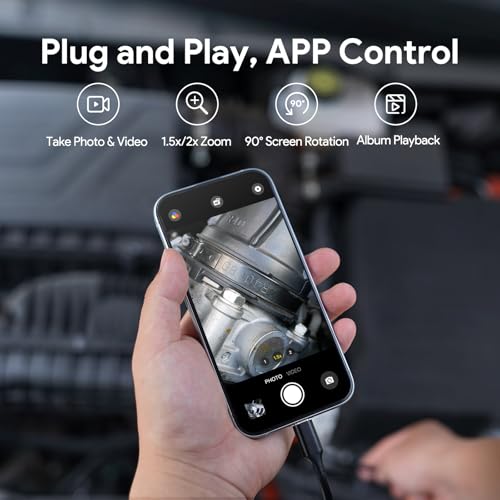


DEPSTECH NTC55 2K Dual-Lens Borescope
A 2K picture with a side camera, wired to an Android phone
- Connection
- USB-C, wired (Android 9+)
- Resolution
- 2K (2560 × 1440), dual lens
- Cable
- 16.5 ft
- 2K front and side cameras
- Plugs in over USB-C: no WiFi pairing or WiFi lag
- 8+1 adjustable LEDs, IP67 probe; hook and magnet included
- 7.9 mm probe is tight in 12 mm plug holes and may not pass 10 mm ones
- Needs a phone with USB OTG switched on
Our pick for a wired Android scope: 2K, front and side cameras, and a plain USB-C connection with no WiFi to join. Turn on OTG in your phone's settings first.
The 7.9 mm probe is tight in 12 mm plug holes, the cable ties up the phone's port, and the app draws complaints about slow camera switching.
Based on the maker's specifications and manual and the published reviews linked below, not on our own test of this unit.
Setup, everyday use and what others found
Setup & use · per the maker
- Plugs into the phone over USB-C, with a Lightning adapter in the box, for iOS 11 or later and Android 9 or later. It works only through the DEPSTECHCAM app, and Android phones need OTG turned on.
- The app switches between the front and side cameras and handles capture, 2× zoom and 90° rotation. It works offline and needs no account.
- Images at up to 2560 × 1440 (2K), with 8 LEDs on the front camera and 1 on the side.
- 7.9 mm probe on a 16.5 ft (5 m) semi-rigid cable, rated IP67, with hook and magnet tips included.
- DEPSTECH offers two years of product support.
What others found
The DEPSTECHCAM app has weak ratings. Reviewers complain about slow switching between cameras and the app not detecting the scope unless it's plugged in before the app opens; one says the hardware is excellent but the Android app is buggy. Those reviews cover all DEPSTECH phone scopes.
This dual-lens NTC55 is new, and we found no independent hands-on test.
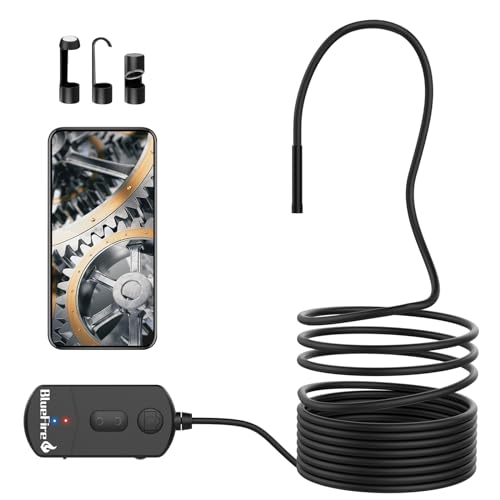


BlueFire 1080p WiFi Borescope (5.5 mm)
A wireless scope that keeps the phone free and still fits many cylinders
- Connection
- WiFi (Android 7+)
- Resolution
- 1080p, 5.5 mm
- Cable
- 11.5 ft
- 5.5 mm probe fits many spark-plug holes
- Own 1800 mAh battery, about 3–4 hours
- Three-step zoom
- Some WiFi lag
- Only the camera and cable are waterproof, not the WiFi box
The simple wireless choice: the scope makes its own WiFi network, so it works with Android 7 or later and nothing plugs into the charge port. The 5.5 mm probe passes most plug holes.
The app has weak ratings, and only the lens and cable are waterproof.
Based on the maker's specifications and manual and the published reviews linked below, not on our own test of this unit.
Setup, everyday use and what others found
Setup & use · per the maker
- Join the camera's WiFi network from your phone's WiFi settings, then open the viewing app. Older versions of the listing name the app as Scope View.
- Plus and minus buttons step through three levels of digital zoom, and the listing says the 6 LEDs are adjustable.
- Resolution can be set to 1920 × 1080, 1280 × 720 or 640 × 480. Photos and video are saved through the app on your phone.
- Sharpest about 1–4 in (3–10 cm) from the lens, with a 60° view. Zoom does not extend that range.
- The 1800 mAh battery is listed at about 3–4 hours; a micro-USB cable comes in the box, along with hook, magnet and mirror tips.
- Only the lens and cable are waterproof (IP68, under 10 minutes submerged), so keep the WiFi box dry.
What others found
The viewing app named in the listing has weak ratings in both app stores. Complaints there include confusing setup, a WiFi link that will not connect and settings that do not stick. Those reviews cover every camera that uses the app, not only BlueFire's.
We found no independent hands-on test of this model.


NIDAGE 3.9mm WiFi Borescope
Reaching inside a cylinder wirelessly
- Connection
- WiFi (Android 5+)
- Resolution
- 1080p, 3.9 mm
- Cable
- 5 ft
- 3.9 mm probe fits spark-plug holes
- 6 adjustable LEDs, IP67 probe
- Also works with iPhone and iPad
- Short 5 ft cable
- WiFi lag
The thinnest probe on this page at 3.9 mm, so it passes even small plug holes, and the semi-rigid cable holds a bend to aim the camera at the bore wall.
It streams over WiFi through an app with poor reviews, and the 5 ft cable is short for anything beyond an engine.
Based on the maker's specifications and manual and the published reviews linked below, not on our own test of this unit.
Setup, everyday use and what others found
Setup & use · per the maker
- Install the HD WiFi app, join the camera's own WiFi network from your phone's settings, then open the app to see the picture.
- Pick 1920 × 1080, 1280 × 720 or 640 × 480. The 2 MP camera is lit by 6 adjustable LEDs.
- Sharpest about 3–10 cm (1.2–3.9 in) from the lens, so work close.
- The 5 ft semi-rigid cable bends and holds its shape; there is no articulation.
- The probe and cable are IP67; keep the WiFi box dry.
- The listing gives iPhone and iPad on iOS 9 or later and Android 5 or later.
What others found
The HD WiFi app has weak ratings in both app stores. Reviewers report the phone saying it has no internet connection while the app shows no picture, along with a stretched image and buttons that sit off-screen. Those reviews cover every camera that uses the app, not only NIDAGE's.
We found no independent hands-on test of this model.


Klein Tools ET21 WiFi Borescope
Quick, close-in checks where toughness and battery life matter more than resolution
- Connection
- WiFi
- Resolution
- 480p, 5.5 mm
- Cable
- 5 ft
- IP67 camera and gooseneck (body IP42), 2 m drop-tested
- Up to 30 ft WiFi range in open space; 8.5 hr battery (USB-C charging)
- Hook attachment and carrying case included
- 480p is the lowest resolution on this page
- 5 ft cable limits reach
- Works only through Klein's app
A tough, simple scope for trade work: a 5.5 mm camera on a 5 ft gooseneck, a 2 m drop rating and a battery Klein rates at 8.5 hours. It streams to your phone over its own WiFi.
The picture is only 480p, the lowest on this page, and it works only through Klein's app, which so far has few and poor reviews.
Based on the maker's specifications and manual and the published reviews linked below, not on our own test of this unit.
Setup, everyday use and what others found
Setup & use · per the maker
- Hold the power button for about 3 seconds, then connect to the scope's WiFi (KT ET21) from Klein's app; the app is required. It needs iOS 12 or Android 9 or later.
- The power button also steps the LED brightness. Photo, video and 90° rotation are in the app.
- 640 × 480 at 25 fps. Files save to the app's gallery, and you have to disconnect from the scope's WiFi before you can send them.
- 5.5 mm camera on a 5 ft (1.5 m) gooseneck. Klein gives about 30 ft of WiFi range in open space.
- Internal 2600 mAh battery rated at 8.5 hours, charging over USB-C in about 3 hours. It switches itself off after 15 minutes without a button press.
- The camera and gooseneck are IP67, but the body is only IP42, and it's drop-rated to 2 m (6.5 ft). It isn't insulated. Rated to work from 5 to 131 °F (−15 to 55 °C).
What others found
Klein's iPhone app has low ratings from a handful of reviewers, who mention the phone trying to leave the scope's WiFi and a connect button hidden on small iPhone screens.
On Google Play, where the app also rates poorly, one reviewer objects to a logo and timestamp stamped on every photo with no way to turn them off.
We found no independent hands-on test of the ET21; the published Klein tests we found cover the earlier ET20.


Teslong 5MP Autofocus USB Borescope
One scope for an Android phone and a laptop, with autofocus
- Connection
- Wired: USB-A or micro-USB (USB-C adapter)
- Resolution
- 5 MP autofocus
- Cable
- 16.5 ft
- 5 MP with autofocus, from about 1.2 in to infinity per Teslong
- Works with OTG Android phones, Windows PCs and Macs
- Mirror, hook, magnet and carrying case included
- Thick probe (12.5 mm on Teslong's matching NTC125), and no iPhone support
- Needs a phone with USB OTG and UVC support, plus a third-party camera app
The one to buy if you want the same scope on an Android phone and a laptop. It's a plain USB camera, so a PC or Mac sees it without special software, and its autofocus is rated from about 1.2 in to infinity.
The probe is thick (12.5 mm on Teslong's matching NTC125), it won't work with iPhones, and some Android phones lack the camera support it needs.
Based on the maker's specifications and manual and the published reviews linked below, not on our own test of this unit.
Setup, everyday use and what others found
Setup & use · per the maker
- Plugs into a PC or Mac over USB-A, or into an Android phone through micro-USB or the included USB-C adapter. It doesn't work with iPhone or iPad.
- Android phones need both OTG and UVC camera support; the listing names the Galaxy S9, S9+, Galaxy Tab A and LG G5 among phones that won't work. Teslong's own Android apps have been pulled from Google Play, so plan on a third-party camera app such as CameraFi.
- On Windows it works with the built-in Camera app or Amcap; on a Mac, with QuickTime.
- 5 MP autofocus camera. Teslong's NTC125 page gives a 70° view, focus from about 1.2 in to infinity, and a 12.5 mm probe on a 5 m (16.4 ft) cable rated IP67 to 1 m for 30 minutes.
- The Amazon listing quotes focus from 0.7 in and a different LED count, so details may vary from Teslong's own spec.
- In the box: hook, magnet and mirror tips and the USB-C adapter. The Amazon listing adds a carrying case.
What others found
Archived reviews of Teslong's former Android apps show the compatibility split: one owner's Pixel 3 XL worked with the included USB-C adapter, while a Galaxy S9 showed only a black screen.
On Teslong's older app, a Galaxy Note 8 owner said the app didn't seem to find the camera.
We found no independent hands-on test. Amazon's listing gives the model as NTC140S; Teslong's closest model, the NTC125, has similar core specs, but the listing's focus range and LED count differ.
- Aeronautics diploma
- Engineering degree
- BAMEC (DGCA)
- QC-trained
- ~2 yrs tool management
Why you should trust us
SK Kutubuddin spent over two decades maintaining and inspecting aircraft, and borescope inspection of turbine and compressor blades was core daily work. In that job an unreliable feed means an incomplete inspection. That is why this page weighs how a scope connects to an Android phone, wired or wireless, as heavily as its resolution: a picture that lags, freezes or drops out is hard to trust.
Android gives buyers two routes, a plug-in USB-C camera or a WiFi model, so we picked across both. Connection type, resolution, probe diameter and cable length were each checked against the manufacturer's specifications and current listings, as set out on our How We Test page, and we say plainly where a probe is a tight fit for cylinder work.
Who this is for
This page is for Android phone and tablet owners who want an inspection camera without buying a dedicated screen. The wired USB-C picks suit people who want a steady image at close range, without WiFi lag; the wireless picks suit anyone who would rather keep the phone free of cables or needs to hold it further from the probe.
If you mostly work under a hood and inspect often, a standalone-screen scope from our automotive picks may still be the better tool.
- Android owners whose phone supports USB OTG
- Budget buyers who want the simplest way to get a picture
- DIYers doing drain, wall and appliance checks as well as car work
- Anyone who also wants to use the scope on a Windows or Mac computer
How we picked
We picked for the way Android actually connects, then compared image quality and reach within each route. All specs were verified against the maker's data and the current listing.
- 01
Both connection routes
We included wired USB-C and WiFi scopes because they solve different problems. Wired gives a direct feed with no pairing and no battery to charge; WiFi keeps the phone untethered. Each pick states its connection clearly so you can match it to your phone and your habits.
- 02
Resolution you can read on a phone
We covered the range from a 480p compact wireless scope and 1080p WiFi cameras to a 5 MP autofocus USB camera and a 2K (2560 × 1440) plug-in model, since the step up is easy to see on a phone screen. We relied on each maker's stated resolution and did not present those figures as our own test results.
- 03
Probe size matched to the job
We included a 3.9 mm wireless probe for spark-plug-hole access and flagged the 7.9 mm wired probe as a tight fit in plug holes, better used as a general-purpose camera, so nobody buys the wrong size for engine work.
- 04
Cable length and build
Longer cables help in drains and walls, while shorter ones are easier to control. We checked stated cable lengths, which run from 5 to 16.5 feet across our picks, along with waterproof ratings and semi-rigid construction where the maker specifies them.
- 05
A clear price ladder
We kept low-cost WiFi options and a rugged, compact wireless scope alongside the sharper wired models, so you can decide how much image quality your jobs actually need before you spend more.
What to know before you buy
Wired USB-C on Android
Most Android phones support USB OTG, so a USB-C borescope plugs directly into the charge port and shows the feed with no pairing and no WiFi lag.
Check that your phone supports OTG and that it is switched on (some phones hide it in settings). If you would rather not tether a cable to the phone, a WiFi model works exactly as it does on any phone.
Wired vs wireless
Wired USB-C avoids WiFi lag and dropouts, at the cost of a cable running to your phone and a drain on its battery. Wireless is tidier, carries its own battery and lets the phone sit further from the probe, with a little lag. For close, fiddly work, wired has the edge; for convenience, wireless wins.
Probe size still matters
As on any borescope, the probe has to fit: about 3.9 mm passes almost any spark-plug hole, 5.5 mm passes most car plug holes, and an 8 mm-class probe fits 14 mm plug holes but is tight or too big in smaller ones, though it suits general engine-bay and around-the-back work.
When a wired scope shows a black screen
A USB-C scope that plugs in and shows nothing is usually a phone setting or a fit problem rather than a faulty camera. Work through these in order:
- Check for an OTG setting. Some phones have a switch for it in settings, and on some models it turns itself off after a period without use.
- Remove a thick phone case. It can stop the plug from seating fully, which is enough to break the connection.
- Use the app the maker recommends. Many wired scopes also work as a standard USB camera, but not every camera app will detect one.
- If you are using an adapter or extension, make sure it carries data, not just charging current.
- Unplug, close the app, plug back in and reopen it, then grant camera or USB access when the phone asks.
- Still nothing? Try the scope on a second phone or a computer. That tells you quickly whether the problem is the camera or the phone, which is the first thing the seller or maker will ask.
Power and heat on long jobs
A plug-in USB-C scope typically has no battery of its own. The camera and its LEDs run from your phone, so a long session in a dark cavity drains the phone faster than normal use, and turning the lights up drains it faster still. Start with a full charge, and set the LEDs to the lowest level that still gives a clear image.
Because the scope occupies the charging port, you usually cannot charge the phone while it is plugged in. If you expect to work for a long stretch, a WiFi model makes more sense: it carries its own battery, and your phone can sit on a charger or power bank while you inspect.
Heat is the other limit. Phones dim the screen and slow down when they get too hot, and a phone lying in direct sun on a fender or a roof will reach that point sooner. Keep it shaded, and never rest it on an engine or exhaust that is still warm.
Frequently asked questions
How do I connect a borescope to an Android phone?
Either plug a USB-C (OTG) borescope directly into the charge port, or use a WiFi model that streams to an app over its own hotspot.
Wired USB-C or wireless for Android?
Wired avoids WiFi lag but tethers a cable to the phone and runs from its battery; wireless is tidier, has its own battery and reaches further, with a little lag.
Does my Android support a USB-C borescope?
Most modern Android phones support USB OTG, which is what a wired borescope needs. Check your phone's specs if unsure.
What probe size do I need for cylinders?
About 3.9 mm clears almost any spark-plug hole, and 5.5 mm suits most car engines. An 8 mm-class probe fits 14 mm plug holes but is tight in 12 mm ones and may not pass 10 mm ones.
What resolution should I look for?
Treat 1080p as the floor. A 2K or 5 MP autofocus camera reads cleaner on a phone screen; 480p suits quick, close-in checks only.
Can I use an Android borescope on a computer too?
Often, yes. The Teslong 5 MP autofocus pick on this page is listed as working with Windows PCs and MacBooks as well as Android. A laptop screen makes it easier to review footage, but check the maker's listing for your specific model before relying on it.
Why does the borescope app want location permission?
On many Android versions, apps need location permission to scan for and join WiFi networks, and a wireless scope app has to find the camera's hotspot. A location request from a WiFi scope app is therefore not unusual. A wired USB-C app has less reason to ask, so question any permission that does not fit what the app does.
Is it safe to install the app from the QR code in the box?
Prefer the maker's listing in the Google Play Store, found by searching the app name given in the manual. If a QR code or leaflet points to a downloadable APK file instead, confirm that it comes from the maker's own website before installing, because side-loaded apps bypass the Play Store's review process.
Related reading
- Aeronautics diploma
- Engineering degree
- BAMEC (DGCA)
- QC-trained
- ~2 yrs tool management
SK spent over two decades in aircraft maintenance, working hands-on with aero-engine systems and flight data recorder systems, borescope-inspecting turbine and compressor blades, and spending almost two years in a dedicated tool bay. He holds a diploma in mechanical engineering (aeronautics), an associate degree in science, an engineering degree and a Basic Aircraft Maintenance Engineer's Certificate (BAMEC) from DGCA, and has completed quality-control and aviation fuels & lubricants training. GaugeGrade applies the same inspection, torque and tool-management standards to the tools everyday mechanics, DIYers and trades actually buy.